Email Anomaly Detection: Catching Sender Issues in Real Time
Problems in email sending compound fast. Automated anomaly detection catches issues in minutes, not hours — before they become reputation emergencies.
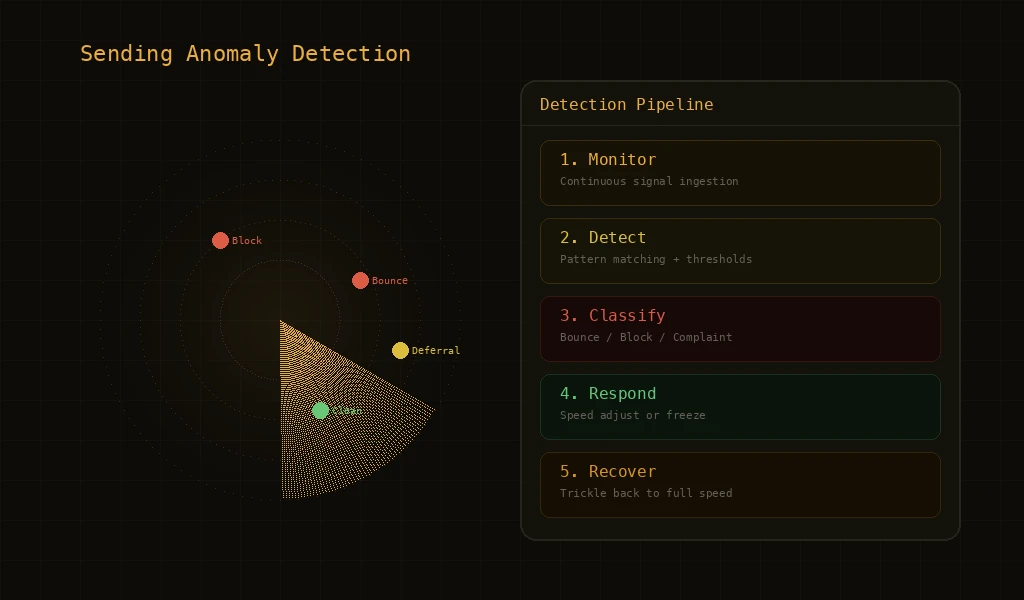
Email reputation damage happens fast and recovers slowly. A bounce rate spike that runs unchecked for two hours can take weeks to recover from. An ISP block that persists because nobody noticed can spread to other ISPs through shared blocklists. Anomaly detection in email platforms is the practice of automatically identifying unusual sending patterns — and crucially, taking protective action before a human needs to intervene. It is the difference between catching a problem at the 'unusual trend' stage versus the 'reputation emergency' stage.
What Counts as a Sending Anomaly
- Bounce Rate Spikes: A sudden increase in bounce rate — hard or soft — indicates something has changed. It could be list quality degradation, a DNS misconfiguration, or an ISP-side issue. The anomaly system detects when bounce rates exceed historical norms for this sender.
- Block Clusters: When multiple ISPs start blocking your email in a short time window, that's a block cluster. This is more urgent than individual blocks because it suggests a widespread reputation issue rather than a single ISP's policy.
- Complaint Surges: A sudden increase in spam complaints indicates recipients are unhappy with your email. Complaint surges are particularly dangerous because ISPs weight complaints heavily in reputation calculations.
- Deferral Patterns: ISPs use deferrals to signal congestion or suspicion. A pattern of increasing deferrals from a specific ISP is an early warning that the ISP is losing trust in your sending.
- Engagement Drops: While less urgent than blocks or complaints, a significant drop in open or click rates can indicate deliverability problems — emails may be landing in spam folders even though they're not bouncing.
Real-time Detection vs Daily Reports
The most common approach to monitoring email sending is daily reports — a summary of yesterday's metrics delivered each morning. For low-volume senders, this is adequate. For high-volume senders processing thousands or millions of emails per day, daily reports are dangerously slow. A lot of damage can happen in 24 hours. Live detection processes every delivery signal as it arrives. A bounce, a block, a complaint — each event is evaluated against current baselines and historical patterns. When the system detects that metrics are deviating from normal patterns, it can trigger protective measures within minutes.
Cascade Detection
Some anomalies are isolated — a single campaign hitting a bad list segment, or a single ISP having a temporary issue. Others are systemic — problems that affect multiple campaigns, multiple domains, or multiple ISPs simultaneously. Cascade detection identifies when isolated problems are spreading. If one campaign's bounce rate spikes, that's a campaign-level issue. If multiple campaigns from the same domain start showing elevated bounces, that's a domain-level issue. If multiple domains from the same account are affected, that's an account-level issue requiring account-level response. Each escalation level triggers proportionally stronger protective measures.
Automated Response Patterns
- Alert and Intensify Monitoring: At the first sign of anomaly, the system intensifies monitoring frequency. Metrics that are normally evaluated periodically are now evaluated continuously. This gives the system maximum visibility to determine if the anomaly is transient or persistent.
- Reduce Sending Speed: If the anomaly persists or worsens, sending speed is automatically reduced. This limits the rate at which problematic emails are sent, giving ISPs time to process the existing volume and giving the system time to evaluate trends.
- Isolate the Problem: The system identifies which entity is causing the anomaly — a specific campaign, domain, or sending pattern — and applies controls specifically to that entity. Unaffected sending continues normally.
- Temporary Protection: If reduction and isolation don't resolve the anomaly, the affected entity's sending is temporarily paused. This prevents further damage while preserving the sender's ability to investigate and fix the root cause.
The Speed of Detection Matters
Consider a scenario where a campaign starts sending to a list with a 15% bounce rate (well above the safe threshold). At 1,000 emails per minute, that's 150 bounces per minute accumulating against your domain's reputation. After 30 minutes, you have 4,500 bounces. After 2 hours, you have 18,000 bounces. A system that detects anomalies within minutes catches this at 150-300 bounces — easily recoverable. A daily report catches it at 18,000+ bounces — potentially causing weeks of reputation impact. Detection speed is not a nice-to-have feature; it directly determines how much damage an incident can cause.
Notification and Transparency
Automated detection and response must be paired with clear notification. When the system takes protective action, senders need to know what happened, why, and what they can do about it. Effective notification includes: the specific anomaly detected, the protective action taken, the affected entity, the metrics that triggered the response, and guidance on investigating the root cause. Transparency builds trust — senders are more accepting of automated interventions when they understand the logic behind them.
Key Features
Early Warning System
Detects sending anomalies — bounce spikes, blocks, complaint surges — within minutes of occurrence rather than hours.
Cascade Detection
Identifies when problems spread from campaign to domain to account level, triggering proportional protective responses.
Frequently Asked Questions
What is email anomaly detection?
Email anomaly detection is the practice of monitoring sending data in real time to identify abnormal patterns — sudden bounce spikes, ISP block events, deferral surges, complaint clusters — that indicate a deliverability problem before it cascades. Modern platforms run this at multiple levels (sender, domain, IP, campaign) so an issue on one slice doesn't drag the whole sending operation down.
How fast should email anomaly detection respond?
Useful detection happens at minute-level granularity, not hourly or daily. ISPs apply throttling and blocks within seconds of detecting bad sending behavior, so a daily report is too late — by then the damage to sender reputation is already locked in. Production-grade systems respond within 30–60 seconds of an anomalous signal.
What signals does email anomaly detection watch?
The core signals are bounce rate, soft-bounce/deferral rate, ISP block codes, complaint rate, and engagement collapse. Mature systems also watch derived signals like rate-of-change (acceleration of bounces), per-ISP divergence (one ISP blocking but others fine), and per-domain or per-campaign correlation that flags issues before any single absolute threshold trips.
How is anomaly detection different from bounce monitoring?
Bounce monitoring tells you the absolute number — "you had 47 bounces today." Anomaly detection tells you the meaning — "your bounce rate to Gmail just jumped 8× in 10 minutes, which historically precedes a block." It's the difference between recording weather and forecasting it. Anomaly detection requires baseline comparison, multi-level aggregation, and statistical significance, not just counting.
Can email anomaly detection prevent reputation damage automatically?
Yes. The typical pattern is a graduated automated response: warn → throttle → pause → freeze → recover. When the system detects an anomaly above threshold, it automatically slows or stops sending on the affected slice (a campaign, a domain, an IP), waits for signals to normalize, then ramps back up. This prevents the cascade of bad sending leading to blocks leading to reputation drop leading to more bad sending.
Further Reading
For more tutorials and deep dives, head back to the blog.